viernes, 22 de mayo de 2020

Learn A-Z Kali_Linux Commands For Beginerrs

Iemhacker-linux-command-for-beginner

All commands (A-Z) for Kali Linux here:
A
apropos Search Help manual pages (man -k)
apt-get Search for and install software packages (Debian/Ubuntu)
aptitude Search for and install software packages (Debian/Ubuntu)
aspell Spell Checker
awk Find and Replace text, database sort/validate/index
B
basename Strip directory and suffix from filenames
bash GNU Bourne-Again SHell
bc Arbitrary precision calculator language
bg Send to background
break Exit from a loop •
builtin Run a shell builtin
bzip2 Compress or decompress named file(s)
C
cal Display a calendar
case Conditionally perform a command
cat Concatenate and print (display) the content of files
cd Change Directory
cfdisk Partition table manipulator for Linux
chgrp Change group ownership
chmod Change access permissions
chown Change file owner and group
chroot Run a command with a different root directory
chkconfig System services (runlevel)
cksum Print CRC checksum and byte counts
clear Clear terminal screen
cmp Compare two files
comm Compare two sorted files line by line
command Run a command – ignoring shell functions •
continue Resume the next iteration of a loop •
cp Copy one or more files to another location
cron Daemon to execute scheduled commands
crontab Schedule a command to run at a later time
csplit Split a file into context-determined pieces
cut Divide a file into several parts
D
date Display or change the date & time
dc Desk Calculator
dd Convert and copy a file, write disk headers, boot records
ddrescue Data recovery tool
declare Declare variables and give them attributes •
df Display free disk space
diff Display the differences between two files
diff3 Show differences among three files
dig DNS lookup
dir Briefly list directory contents
dircolors Colour setup for `ls'
dirname Convert a full pathname to just a path
dirs Display list of remembered directories
dmesg Print kernel & driver messages
du Estimate file space usage
E
echo Display message on screen •
egrep Search file(s) for lines that match an extended expression
eject Eject removable media
enable Enable and disable builtin shell commands •
env Environment variables
ethtool Ethernet card settings
eval Evaluate several commands/arguments
exec Execute a command
exit Exit the shell
expect Automate arbitrary applications accessed over a terminal
expand Convert tabs to spaces
export Set an environment variable
expr Evaluate expressions
F
false Do nothing, unsuccessfully
fdformat Low-level format a floppy disk
fdisk Partition table manipulator for Linux
fg Send job to foreground
fgrep Search file(s) for lines that match a fixed string
file Determine file type
find Search for files that meet a desired criteria
fmt Reformat paragraph text
fold Wrap text to fit a specified width.
for Expand words, and execute commands
format Format disks or tapes
free Display memory usage
fsck File system consistency check and repair
ftp File Transfer Protocol
function Define Function Macros
fuser Identify/kill the process that is accessing a file
G
gawk Find and Replace text within file(s)
getopts Parse positional parameters
grep Search file(s) for lines that match a given pattern
groupadd Add a user security group
groupdel Delete a group
groupmod Modify a group
groups Print group names a user is in
gzip Compress or decompress named file(s)
H
hash Remember the full pathname of a name argument
head Output the first part of file(s)
help Display help for a built-in command •
history Command History
hostname Print or set system name
I
iconv Convert the character set of a file
id Print user and group id's
if Conditionally perform a command
ifconfig Configure a network interface
ifdown Stop a network interface
ifup Start a network interface up
import Capture an X server screen and save the image to file
install Copy files and set attributes
J
jobs List active jobs •
join Join lines on a common field
K
kill Stop a process from running
killall Kill processes by name
L
less Display output one screen at a time
let Perform arithmetic on shell variables •
ln Create a symbolic link to a file
local Create variables •
locate Find files
logname Print current login name
logout Exit a login shell •
look Display lines beginning with a given string
lpc Line printer control program
lpr Off line print
lprint Print a file
lprintd Abort a print job
lprintq List the print queue
lprm Remove jobs from the print queue
ls List information about file(s)
lsof List open files
M
make Recompile a group of programs
man Help manual
mkdir Create new folder(s)
mkfifo Make FIFOs (named pipes)
mkisofs Create an hybrid ISO9660/JOLIET/HFS filesystem
mknod Make block or character special files
more Display output one screen at a time
mount Mount a file system
mtools Manipulate MS-DOS files
mtr Network diagnostics (traceroute/ping)
mv Move or rename files or directories
mmv Mass Move and rename (files)
N
netstat Networking information
nice Set the priority of a command or job
nl Number lines and write files
nohup Run a command immune to hangups
notify-send Send desktop notifications
nslookup Query Internet name servers interactively
O
open Open a file in its default application
op Operator access
P
passwd Modify a user password
paste Merge lines of files
pathchk Check file name portability
ping Test a network connection
pkill Stop processes from running
popd Restore the previous value of the current directory
pr Prepare files for printing
printcap Printer capability database
printenv Print environment variables
printf Format and print data •
ps Process status
pushd Save and then change the current directory
pwd Print Working Directory
Q
quota Display disk usage and limits
quotacheck Scan a file system for disk usage
quotactl Set disk quotas
R
ram ram disk device
rcp Copy files between two machines
read Read a line from standard input •
readarray Read from stdin into an array variable •
readonly Mark variables/functions as readonly
reboot Reboot the system
rename Rename files
renice Alter priority of running processes
remsync Synchronize remote files via email
return Exit a shell function
rev Reverse lines of a file
rm Remove files
rmdir Remove folder(s)
rsync Remote file copy (Synchronize file trees)
S
screen Multiplex terminal, run remote shells via ssh
scp Secure copy (remote file copy)
sdiff Merge two files interactively
sed Stream Editor
select Accept keyboard input
seq Print numeric sequences
set Manipulate shell variables and functions
sftp Secure File Transfer Program
shift Shift positional parameters
shopt Shell Options
shutdown Shutdown or restart linux
sleep Delay for a specified time
slocate Find files
sort Sort text files
source Run commands from a file `.'
split Split a file into fixed-size pieces
ssh Secure Shell client (remote login program)
strace Trace system calls and signals
su Substitute user identity
sudo Execute a command as another user
sum Print a checksum for a file
suspend Suspend execution of this shell •
symlink Make a new name for a file
sync Synchronize data on disk with memory
T
tail Output the last part of file
tar Tape ARchiver
tee Redirect output to multiple files
test Evaluate a conditional expression
time Measure Program running time
times User and system times
touch Change file timestamps
top List processes running on the system
traceroute Trace Route to Host
trap Run a command when a signal is set(bourne)
tr Translate, squeeze, and/or delete characters
true Do nothing, successfully
tsort Topological sort
tty Print filename of terminal on stdin
type Describe a command •
U
ulimit Limit user resources •
umask Users file creation mask
umount Unmount a device
unalias Remove an alias •
uname Print system information
unexpand Convert spaces to tabs
uniq Uniquify files
units Convert units from one scale to another
unset Remove variable or function names
unshar Unpack shell archive scripts
until Execute commands (until error)
uptime Show uptime
useradd Create new user account
userdel Delete a user account
usermod Modify user account
users List users currently logged in
uuencode Encode a binary file
uudecode Decode a file created by uuencode
V
v Verbosely list directory contents (`ls -l -b')
vdir Verbosely list directory contents (`ls -l -b')
vi Text Editor
vmstat Report virtual memory statistics
W
wait Wait for a process to complete •
watch Execute/display a program periodically
wc Print byte, word, and line counts
whereis Search the user's $path, man pages and source files for a program
which Search the user's $path for a program file
while Execute commands
who Print all usernames currently logged in
whoami Print the current user id and name (`id -un')
wget Retrieve web pages or files via HTTP, HTTPS or FTP
write Send a message to another user
X
xargs Execute utility, passing constructed argument list(s)
xdg-open Open a file or URL in the user's preferred application.
yes Print a string until interrupted
. Run a command script in the current shell
!! Run the last command again
Continue reading

jueves, 21 de mayo de 2020

Cain And Abel

"Cain & Abel is a password recovery tool for Microsoft Operating Systems. It allows easy recovery of various kind of passwords by sniffing the network, cracking encrypted passwords using Dictionary, Brute-Force and Cryptanalysis attacks, recording VoIP conversations, decoding scrambled passwords, recovering wireless network keys, revealing password boxes, uncovering cached passwords and analyzing routing protocols. The program does not exploit any software vulnerabilities or bugs that could not be fixed with little effort. It covers some security aspects/weakness present in protocol's standards, authentication methods and caching mechanisms; its main purpose is the simplified recovery of passwords and credentials from various sources, however it also ships some "non standard" utilities for Microsoft Windows users." read more...

Website: http://www.oxid.it/cain.html

More info


Top Users Command In Linux Operating System With Descriptive Definitions


Linux is a command line interface and has a graphical interface as well. But the only thing we should know how we interact with Linux tools and applications with the help of command line. This is the basic thing of Linux.  As you can do things manually by simple clicking over the programs just like windows to open an applications. But if you don't have any idea about commands of Linux and definitely you also don't know about the Linux terminal. You cannot explore Linux deeply. Because terminal is the brain of the Linux and you can do everything by using Linux terminal in any Linux distribution. So, if you wanna work over the Linux distro then you should know about the commands as well.
In this blog you will get a content about commands of Linux which are collectively related to the system users. That means if you wanna know any kind of information about the users of the system like username passwords and many more.

id

The "id" command is used in Linux operating system for the sake of getting knowledge about active user id with login and group. There may be different users and you wanna get a particular id of the user who is active at that time so for this you just have to type this command over the terminal.

last

The "last" command is used in Linux operating system to show the information about the last logins on the system. If you forget by which user id you have logged in at last time. So for this information you can search login detail by using this command.

who

The "who" command is used in Linux distributions to display the information about the current user which a an active profile over the Linux operating system. If you are in the system and you don't know about that active user and suddenly you have to know about that user detail so you can get the info by using this command.

groupadd

The "groupadd admin" is the command which is used in Linux operating system to add a group in the Linux system to gave the privileges to that group.

useradd

The "useradd" command is used in Linux operating system to add user or users to a specific group. If you wanna add a user name Umer so for this matter you just have to write a command i.e. useradd -c "Umer".

userdel

The "userdel" command is used in Linux operating system for the purpose to delete any user or users from the particular group present in the linux operating system. For example "userdel Umer" this command will delete the user named Umer.

adduser

The "adduser" command is a simple command used to create directly any user in the system. There is no need to make a group for this. You just have to type the command with user name like adduser Umer, it will created a user by name Umer.

usermod

The "usermod" is a command used in Linux operating system to modify the information of any particular user. You can edit or delete information of any particular user in the Linux operating system.


More info


Top 20 Android Spy Apps That Will.Make U Fell Like A Dectitive

             Top 10 Best android spy apps.                 

t's worth to note that there are plenty of Android spy apps available on the Google Play Store, but mentioning all of them is not possible. So, in this article, we have listed the one that's popular and used by many. So, let's explore the list of best spy apps 2019.

#1 Spy Camera OS

Spy Camera OS

This app permits users to capture images secretly. This app provides a smart way to shoot photos with a hidden camera interface so people wouldn't notice that you are taking pictures of them. Also, every sound and flash etc get disabled in this app.

#2 Ear Spy

Ear Spy

This is an awesome app to record even low voices. By this app, you can place your phone in the other room and can listen to the voices of that room by your Bluetooth handset. This app actually records the sound and then amplifies its recording and give you the amplified clear voices.

#3 Ip Cam Viewer

Ip Cam Viewer

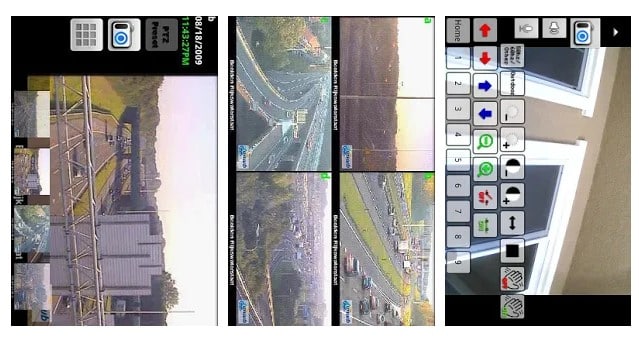
This awesome app allows to remotely view and control your IP Camera, DVR, Network Video Recorder, traffic cameras, CCTV or WebCam from an android device. In its new version, you can also get the notification on detecting motion on the device. This app can automatically start recording whenever it detects motion.

#4 Automatic Call Recorder

Automatic Call Recorder

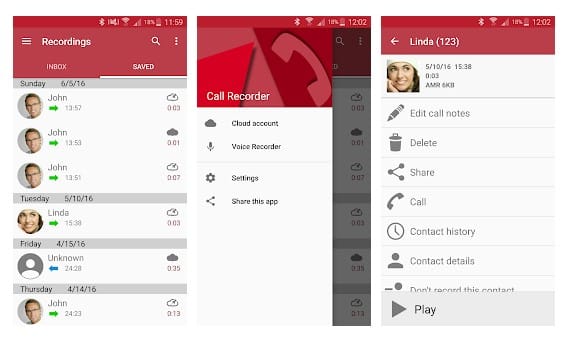
This is another best Spy App that one can have on their Android smartphone. This app gets automatically launched whenever you make or receive any call. It records all the conversation b/w speakers and also the surrounding noise of the device in which it is installed.

#5 Monitor Call Sms Location

Monitor Call Sms Location

This is another good spy app to remotely monitor SMS, Photo, Location, call logs and many more things on an Android device. This will exact location of the targeted device through a web-portal even if GPS disabled on the target device. The app comes with the three-day free trial option.

#6 Anti Spy Mobile

Anti Spy Mobile

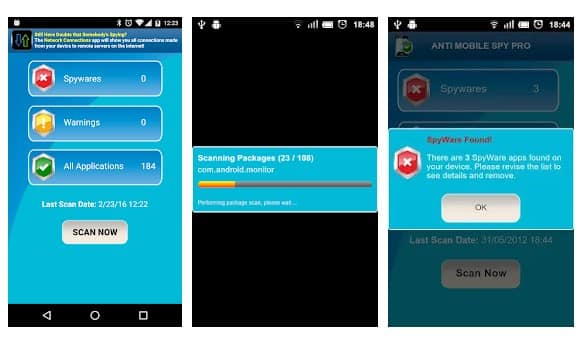
You don't know whether you had installed any spyware software on your phone? Use this app to instantly find the spyware. The Android app uses advanced detection techniques to detect new spyware. So, with this app, you can easily protect yourself from Android spyware.

#7 Hidden Eye

Hidden Eye

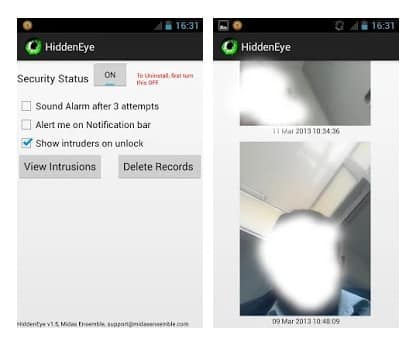
Ever wanted to know who tried snooping on your phone while you were away. Your friends or family member might have tried to unlock your phone. Hidden Eye is a simple app with no frills that will photograph the person when they try to unlock your phone.

#8 AppLock

AppLock

Applock is the most downloaded app lock in Play Store. Protect privacy with password, pattern, fingerprint lock. AppLock can lock Facebook, Whatsapp, Gallery, Messenger, SMS, Contacts, Gmail, Settings, incoming calls and any app you choose. Prevent unauthorized access and guard privacy. Ensure security.

#9 Hide Calls Automatically

Hide Calls Automatically

With this app, all outgoing, incoming and missed calls coming from private contacts will be deleted automatically from calls Log of your phone! No icon of this app will appear in your list of applications on your phone.

#10 Truecaller: Caller ID & Dialer

Truecaller

Truecaller is the only dialer you'll ever need with the ability to identify unknown callers and block unwanted calls. See names and photos of people who call, even if they aren't saved in your phonebook. And know when friends are free to talk, making your calling experience smarter and more delightful.

#11 Cell Tracker

Cell Tracker

You can use the cell tracker Android app to keep track of the location of your smartphone. With the help of this app, you can track all the locations you have visited in the last few days with your Android phone. To check the locations visited you have to launch the app and click on "View Now". No need to turn on the GPS.

#12 Secret Calls

Secret Calls

With the help of this app, all outgoing, Incoming and Missed Calls coming from private contacts will be deleted automatically from Calls Log of your phone! No icon of this app will appear in your list of applications on your phone.

#13 Spy Camera

Spy Camera

This is another Spy app on the list which provides one-touch to capture image feature. The app actually has lots of useful features. With the help of this app, you can find your lost phone because this app allows you to set up a number. When you lost your phone, just SMS to this phone and it will take a picture and upload to drive.

#14 Truecaller

Truecaller

Truecaller is a popular Android app which is used every day to identify unknown calls, block spam calls and spam SMS. It filters out the unwanted and lets you connect with people who matter.

#15 Whoscall – Caller ID

Whoscall - Caller ID

Whoscall, the best caller ID App that identifies unknown calls and blocks annoying spams, robocall & telemarketing with more than 50 million downloads and over 1 billion numbers data. It also got the call blocker that can be used to blacklist or whitelist contacts stored on your smartphone.

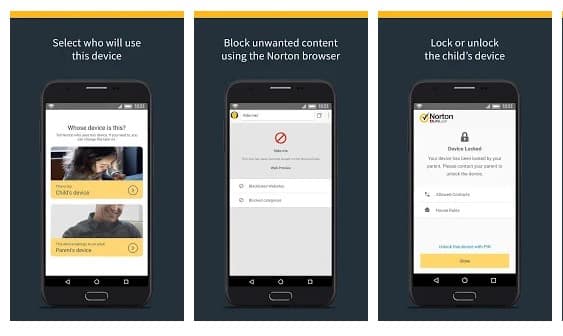
#16 Norton Family parental control

Norton Family parental control

Norton Family parental control is basically an Android app that is meant to keep kids safe online. However, this is nothing sort of a spy app. The app can help you to supervise online activity. You can easily keep track of sites which your friend visit and what they search if you install Norton Family Parental control on their phone.

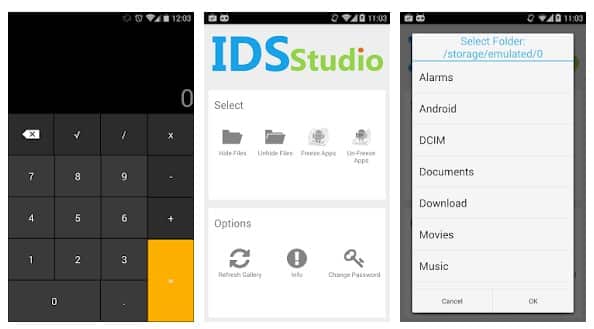
#17 Smart Hide Calculator

Smart Hide Calculator

The app doesn't help users to spy on others. But, it can give you a detective type feeling. Smart hide calculator is a fully functional calculator app but with a little twist. Once you enter the password and press the '=' button then boom you are presented to an interface where you can hide, unhide pictures, videos, documents or files with any file extension.

#18 Hidden Eye

Hidden Eye

Ever wanted to know who tried snooping into your phone while you were away. Your friends or family member might have tried to unlock your phone. Hidden Eye is a simple app with no frills that will photograph the person when they try to unlock your phone.

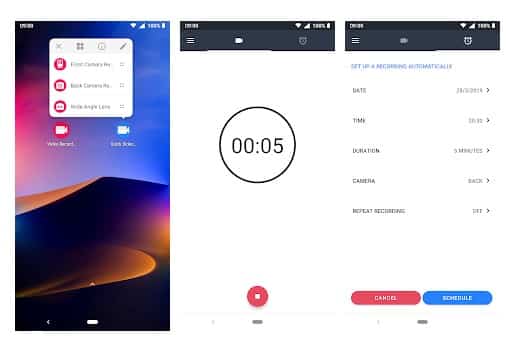
#19 Background Video Recorder

Background Video Recorder

This is another best Android spy app that helps users to record what's happening behind them. Background Video Recorder is basically a camera app that records videos silently on the background. The app eliminates the camera shutter sounds, camera previews and it can also record videos when the screen is off.

#20 Kids Place

Kids Place

Kids Place is another best parental control app in the list and its meant to protect your kids' online activities. However, if you don't have kids, you can use the app to track other devices. The app gives you full control over other devices and you can control everything including calls, text, internet browsing, apps, etc.

@EVERYTHING NT

Related links

  1. Como Ser Hacker
  2. Raspberry Hacking
  3. Fake Hacking
  4. Blackhat Hacking
  5. Best Hacking Games
  6. Hacking Google Home Mini
  7. Hacking Software
  8. Libros Hacking
  9. Live Hacking
  10. Ethical Hacking Course
  11. Rom Hacking Pokemon
  12. Chema Alonso Libros
  13. Hacking To The Gate
  14. Nivel Basico

miércoles, 20 de mayo de 2020

How To Track Iphone Without Them Knowing

Few feelings are as stomach-sinkingly awful as the thought of losing an expensive new iPhone. Whether you left it on the bus or someone slid it out of your back pocket, we put so much store in our phones that their loss leaves is saddened and angered. Most of us keep at least copies of everything in our lives on our phones, from personal conversations to emails, 


To say nothing of all our personal information and social media accounts. Of course there are security measures in place, but nobody wants to risk having all that information fall into the hands of the wrong people. In this article, I will show you how to find a phone that has been lost, whether your own phone or the phone of a friend or family member.

Can you track an iPhone without them knowing?

First off, hopefully you activated the Find My Phone feature of your iPhone when you still had it in your possession. Secondly, if your phone doesn't have service (and thus a connection to the Internet) or if you don't have iCloud set up, then these solutions are not going to work for you. Unfortunately phone technology is advanced but it isn't magical; if your phone isn't talking to the network or if you haven't turned on Find My Phone, then unfortunately the technological solution is probably not going to work. (Seriously. If you have possession of your phone(s) then stop reading this article, pick up your devices, go to Settings and select "Find My Phone" (iPhone) or "Find My Device" (Android) and make sure they are toggled on. TTjem upi cam dp ot/"

Without further ado, let's find your phone!

Can I Tell if Someone is Tracking my iPhone?


image1-3

Usually yes, if someone is using the "Find my Phone" feature, it will be displaying things on the iPhone screen. Thankfully, "Find My iPhone" comes pre-loaded on all phones with iOs 9 or newer. "Find my iPhone" is the gold standard when it comes to locating your lost iPhone. The service is integrated as part of iCloud. Here's how to use it to find your missing iPhone then track down your phone's exact location.

Step 1: Open up the "Find My iPhone" on a different device

It doesn't matter if you decide to use your iPad, your laptop, or a friend's iPhone – you can run the Find My Phone app fr0m Mac. You can use the Find my Phone app.

If you are using an Apple product like another phone or an iPad, you can simply click on the app.

If you are using a computer (even a Windows PC will work), go to icloud.com then click on the "Find iPhone" icon. Once you've clicked on the "Find iPhone" icon the website process and "Find my iPhone" app process are the same.

Step 2: Input Your Apple ID Credentials (they are the same as your iCloud info)

Since you are not using your phone, you won't be automatically logged in.

Once you log in to the app, select the "All Devices" drop-down option and then find the device that you want to locate.

Step 3: Once You Select Your Phone, Options Will Appear

As soon as you select your device on the page, iCloud will begin to search for it. If the search is successful, you will see your device on a map, pinpointing it's location. Before you sprint out the door to get it, there are some other options you should take a look at.

Once you select your device you will have three additional options in addition to seeing your phone's location. These options are playing a sound, activating "Lost Mode" and erase the phone.

Playing the sound is a great way to find your phone if you lost it somewhere around your house. If you click the option, an audio alert will go off on your phone which will hopefully help you find it. The alert will sound like a loud pinging noise alerting you that your phone is at home with you and not at the coffee shop you just visited. If you hear the pinging sound then you'll quickly find your phone by just following the sound.

When enabled, Lost Mode will lock your phone with a passcode and will display a message of your choice. This can either ensure it will be safe until you can find it, or will alert the thief what you expect of them and that you know where they are. This mode can also enable location services on your phone too.

However, if things have gone too far and you think there is a very slim chance you will ever get your device back – perhaps your phone has already crossed an international border – the best course of action is to simply erase it. Yes, this is giving up, but it also prevents your personal information getting into the hands of someone who could abuse it.

If you follow these steps, you should have your phone back in your pocket in no time. 

Is there an app to track someones phone without them knowing?

maxresdefault-11

What if you're looking for someone else's phone? I'm sorry to burst your bubble, but you are not allowed to track someone else's phone without their knowledge. While there are supposedly apps that you can install on a target's phone to track it and keep tabs on what they are doing on it, that is completely illegal and immoral. In addition to the moral issue, there is the practical fact that they could find the app which could lead to a very awkward situation, possibly one involving the police.

However, there are times when you want to find a friend's phone and you have a legitimate reason, and (the important part) they have given you permission to find it. Just as when you were looking for your own phone, there is an app that can help you find the phones of your friends and family with ease. The "Find My Friends" app used to be an extra download, but now it comes with iOS, so if your friends have ever updated their phone, they should have it.

"Find My Friends" is an app that basically allows you to share your location with others and vice versa. It can be great for keeping track of where your kids are, knowing what your significant other is doing, or just keeping tabs on your friends. It can also help them find a lost phone (as long as you have "Shared Locations" with them). Here is how to set it up:

Step 1: Open the app on your phone and the phone of the person you want to be able to share locations with.

Step 2: Click your profile in the bottom left of the screen.

Step 3: Enable "Share My Location" and make sure AirDrop is enabled on your own phone.

Step 4: From there, your friends and family will be able to search/add you to share your location with them and vice versa. You each will need to accept the "Shared Location" request from the other. Now, you can just click on their profile in the app and keep track of them.

As you likely realized while reading this article, it is a much better idea to be proactive than reactive when it comes to tracking phones. If you set up "Find My iPhone" and "Find My Friends" before your phone gets stolen or lost, it will save you a lot of potential hassle down the road. While it may be a bit worrisome to have someone be able to see your location at all times, it can really save you once your phone goes missing and you need to track it down. It is obviously best to pick someone who you trust not to take advantage of the information an app like "Find My Friends" can provide them.

No one deserves to have their phone stolen or go missing, but thankfully, there are some ways to find it, or at least have the information deleted. Hopefully, this guide helped you be able to find your phone or the phone of your friends and family, or at least prepared you for when it may happen.

If you have other ways of finding a lost phone, please share them with us below!

@EVERYTHING NT

Related articles
  1. Servicio Hacker
  2. Hacking Course
  3. Viral Hacking
  4. Marketing Growth Hacking
  5. Hacking Y Forensic Desarrolle Sus Propias Herramientas En Python Pdf
  6. Hacking Traduccion
  7. Linux Hacking
  8. Hardware Hacking Tools
  9. Etica Hacker
  10. Raspberry Hacking
  11. Hacking Games
  12. Hacking Etico 101 Pdf

martes, 19 de mayo de 2020

Blockchain Exploitation Labs - Part 1 Smart Contract Re-Entrancy


Why/What Blockchain Exploitation?

In this blog series we will analyze blockchain vulnerabilities and exploit them ourselves in various lab and development environments. If you would like to stay up to date on new posts follow and subscribe to the following:
Twitter: @ficti0n
Youtube: https://www.youtube.com/c/ConsoleCowboys
URL: http://cclabs.io
          http://consolecowboys.com

As of late I have been un-naturally obsessed with blockchains and crypto currency. With that obsession comes the normal curiosity of "How do I hack this and steal all the monies?"

However, as usual I could not find any actual walk thorough or solid examples of actually exploiting real code live. Just theory and half way explained examples.

That question with labs is exactly what we are going to cover in this series, starting with the topic title above of Re-Entrancy attacks which allow an attacker to siphon out all of the money held within a smart contract, far beyond that of their own contribution to the contract.
This will be a lab based series and I will show you how to use demo the code within various test environments and local environments in order to perform and re-create each attacks for yourself.  

Note: As usual this is live ongoing research and info will be released as it is coded and exploited.

If you are bored of reading already and just want to watch videos for this info or are only here for the demos and labs check out the first set of videos in the series at the link below and skip to the relevant parts for you, otherwise lets get into it:


Background Info:

This is a bit of a harder topic to write about considering most of my audience are hackers not Ethereum developers or blockchain architects. So you may not know what a smart contract is nor how it is situated within the blockchain development model. So I am going to cover a little bit of context to help with understanding.  I will cover the bare minimum needed as an attacker.

A Standard Application Model:
  • In client server we generally have the following:
  • Front End - what the user sees (HTML Etc)
  • Server Side - code that handles business logic
  • Back End - Your database for example MySQL

A Decentralized Application Model:

Now with a Decentralized applications (DAPP) on the blockchain you have similar front end server side technology however
  • Smart contracts are your access into the blockchain.
  • Your smart contract is kind of like an API
  • Essentially DAPPs are Ethereum enabled applications using smart contracts as an API to the blockchain data ledger
  • DAPPs can be banking applications, wallets, video games etc.

A blockchain is a trust-less peer to peer decentralized database or ledger

The back-end is distributed across thousands of nodes in its entirety on each node. Meaning every single node has a Full "database" of information called a ledger.  The second difference is that this ledger is immutable, meaning once data goes in, data cannot be changed. This will come into play later in this discussion about smart contracts.

Consensus:

The blockchain of these decentralized ledgers is synchronized by a consensus mechanism you may be familiar with called "mining" or more accurately, proof of work or optionally Proof of stake.

Proof of stake is simply staking large sums of coins which are at risk of loss if one were to perform a malicious action while helping to perform consensus of data.   

Much like proof of stake, proof of work(mining) validates hashing calculations to come to a consensus but instead of loss of coins there is a loss of energy, which costs money, without reward if malicious actions were to take place.

Each block contains transactions from the transaction pool combined with a nonce that meets the difficulty requirements.  Once a block is found and accepted it places them on the blockchain in which more then half of the network must reach a consensus on. 

The point is that no central authority controls the nodes or can shut them down. Instead there is consensus from all nodes using either proof of work or proof of stake. They are spread across the whole world leaving a single centralized jurisdiction as an impossibility.

Things to Note: 

First Note: Immutability

  • So, the thing to note is that our smart contracts are located on the blockchain
  • And the blockchain is immutable
  • This means an Agile development model is not going to work once a contract is deployed.
  • This means that updates to contracts is next to impossible
  • All you can really do is createa kill-switch or fail safe functions to disable and execute some actions if something goes wrong before going permanently dormant.
  • If you don't include a kill switch the contract is open and available and you can't remove it

Second Note:  Code Is Open Source
  • Smart Contracts are generally open source
  • Which means people like ourselves are manually bug hunting smart contracts and running static analysis tools against smart contract code looking for bugs.

When issues are found the only course of action is:
  • Kill the current contract which stays on the blockchain
  • Then deploy a whole new version.
  • If there is no killSwitch the contract will be available forever.
Now I know what you're thinking, these things are ripe for exploitation.
And you would be correct based on the 3rd note


Third Note: Security in the development process is lacking
  • Many contracts and projects do not even think about and SDLC.
  • They rarely add penetration testing and vulnerability testing in the development stages if at all
  • At best there is a bug bounty before the release of their main-nets
  • Which usually get hacked to hell and delayed because of it.
  • Things are getting better but they are still behind the curve, as the technology is new and blockchain mostly developers and marketers.  Not hackers or security testers.


Forth Note:  Potential Data Exposure via Future Broken Crypto
  • If sensitive data is placed on the blockchain it is there forever
  • Which means that if a cryptographic algorithm is broken anything which is encrypted with that algorithm is now accessible
  • We all know that algorithms are eventually broken!
  • So its always advisable to keep sensitive data hashed for integrity on the blockchain but not actually stored on the blockchain directly


 Exploitation of Re-Entrancy Vulnerabilities:

With a bit of the background out of the way let's get into the first attack in this series.

Re-Entrancy attacks allow an attacker to create a re-cursive loop within a contract by having the contract call the target function rather than a single request from a  user. Instead the request comes from the attackers contract which does not let the target contracts execution complete until the tasks intended by the attacker are complete. Usually this task will be draining the money out of the contract until all of the money for every user is in the attackers account.

Example Scenario:

Let's say that you are using a bank and you have deposited 100 dollars into your bank account.  Now when you withdraw your money from your bank account the bank account first sends you 100 dollars before updating your account balance.

Well what if when you received your 100 dollars, it was sent to malicious code that called the withdraw function again not letting  the initial target deduct your balance ?

With this scenario you could then request 100 dollars, then request 100 again and you now have 200 dollars sent to you from the bank. But 50% of that money is not yours. It's from the whole collection of money that the bank is tasked to maintain for its accounts.

Ok that's pretty cool, but what if that was in a re-cursive loop that did not BREAK until all accounts at the bank were empty?  

That is Re-Entrancy in a nutshell.   So let's look at some code.

Example Target Code:


           function withdraw(uint withdrawAmount) public returns (uint) {
       
1.         require(withdrawAmount <= balances[msg.sender]);
2.         require(msg.sender.call.value(withdrawAmount)());

3.          balances[msg.sender] -= withdrawAmount;
4.          return balances[msg.sender];
        }

Line 1: Checks that you are only withdrawing the amount you have in your account or sends back an error.
Line 2: Sends your requested amount to the address the requested that withdrawal.
Line 3: Deducts the amount you withdrew from your account from your total balance.
Line 4. Simply returns your current balance.

Ok this all seems logical.. however the issue is in Line 2 - Line 3.   The balance is being sent back to you before the balance is deducted. So if you were to call this from a piece of code which just accepts anything which is sent to it, but then re-calls the withdraw function you have a problem as it never gets to Line 3 which deducts the balance from your total. This means that Line 1 will always have enough money to keep withdrawing.

Let's take a look at how we would do that:

Example Attacking Code:


          function attack() public payable {
1.           bankAddress.withdraw(amount);
         }

2.    function () public payable {
         
3.            if (address(bankAddress).balance >= amount) {
4.               bankAddress.withdraw(amount);
                }
}

Line 1: This function is calling the banks withdraw function with an amount less than the total in your account
Line 2: This second function is something called a fallback function. This function is used to accept payments that come into the contract when no function is specified. You will notice this function does not have a name but is set to payable.
Line 3:  This line is checking that the target accounts balance is greater than the amount being withdrawn.
Line 4:  Then again calling the withdraw function to continue the loop which will in turn be sent back to the fallback function and repeat lines over and over until the target contracts balance is less than the amount being requested.


Review the diagram above which shows the code paths between the target and attacking code. During this whole process the first code example from the withdraw function is only ever getting to lines 1-2 until the bank is drained of money. It never actually deducts your requested amount until the end when the full contract balance is lower then your withdraw amount. At this point it's too late and there is no money left in the contract.


Setting up a Lab Environment and coding your Attack:

Hopefully that all made sense. If you watch the videos associated with this blog you will see it all in action.  We will now analyze code of a simple smart contract banking application. We will interface with this contract via our own smart contract we code manually and turn into an exploit to take advantage of the vulnerability.

Download the target code from the following link:

Then lets open up an online ethereum development platform at the following link where we will begin analyzing and exploiting smart contracts in real time in the video below:

Coding your Exploit and Interfacing with a Contract Programmatically:

The rest of this blog will continue in the video below where we will  manually code an interface to a full smart contract and write an exploit to take advantage of a Re-Entrency Vulnerability:


Conclusion: 

In this smart contract exploit writing intro we showed a vulnerability that allowed for re entry to a contract in a recursive loop. We then manually created an exploit to take advantage of the vulnerability. This is just the beginning, as this series progresses you will see other types of vulnerabilities and have the ability to code and exploit them yourself.  On this journey through the decentralized world you will learn how to code and craft exploits in solidity using various development environments and test nets.

More articles


  1. Libros Para Aprender A Hackear
  2. Hacking Udemy
  3. Que Es Growth Hacking
  4. Paginas Para Hackear
  5. Kali Hacking
  6. Manual Del Hacker
  7. Hacking Significado
  8. Growth Hacking Libro
  9. Ingeniería Social. El Arte Del Hacking Personal Pdf
  10. Computer Hacking
  11. Curso De Ciberseguridad Y Hacking Ético

TOP 10 HACKING MOVIES YOU SHOULD WATCH

Technology and hacking gave a new horizon to the science fiction movies. As hacking is getting common and every online thing is at risk whether it's 10% or 90%, not a system is 100% secure over the internet. Every day new security holes are getting discovered. So, now most of the sci-fi movies have the tech and hack stuff to grow awareness in everybody's mind about the online privacy and risk to their information. Here I am sharing top 10 hacking movies that worth a watch.

TOP 10 HACKING MOVIES

Here I have listed top 10 hacking movies that you should watch.

1. HACKERS (1995)

In Hackers, Angelina Jolie and Jonny Lee Miller portray two youthful and hip hackers. Miller portrays a hacker who got caught as a very young child at an age of 11 years after crashing thousands of computers and has been sentenced to zero computer access until his 18th birthday.

2. LIVE FREE OR DIE HARD (2007)

Live Free or Die Hard (also known as Die Hard 4 and released as Die Hard 4.0 outside North America) is a 2007 American action film, and the fourth in the Die Hard film series depicts a scenario where a hacker played by Timothy Olyphant (of Justified fame) takes down nearly the entire U.S. infrastructure in an attempt to transfer trillions of dollars from the Federal Reserve to his account. This movie gives a complete idea of how actually these blackhat hackers operate.

3. EAGLE EYE (2008)

In this movie, two people get a call from an unknown number by a woman. They get a task on the phone that if they don't follow the phone call they would die. This movie displays supercomputer hack on all networks and military networks. This is just an amazing movie on how artificial intelligence computer hacks our real life for bad motives.

4. ALGORITHM (2014)

The film 'Algorithm' tracks the travails of Will, who is the freelance computer hacker who hacks into a top-secret government contractor agency and downloads all their recently developed programs." You can see the full movie below

5. WARGAMES (1983)

The film features David Lightman (Broderick), a young high school student hacker who accidentally hacks into a military supercomputer and starts the countdown to World War III.

6. THE MATRIX (1999)

This is one of the greatest science fiction movies. In this movie, reality, as perceived by most humans, is actually a simulated reality called "the Matrix", created by machines to subdue the human population, while their bodies' heat and electrical activity are used as an energy source.
A character named "Neo", who is a computer Hacker, learns this truth and is drawn into a rebellion against the machines, which involves other people who have been freed from the "dream world". The Matrix franchise is a trilogy movie series.

7. TAKEDOWN (2000)

This movie is based on famous computer U.S. hacker Kevin David Mitnick. Based upon the book and written by his nemesis, Tsutomu Shimomura, the story tends to glorify Shimomura. Mitnick operated in the 1980s and '90s and eventually went to prison for a couple of years. Now, he is a highly paid IT security consultant, speaker, and writer.

8. BLACKHAT (2015)

Blackhat is newly released movie by Chris Hemsworth. In this movie, hackers hack the Chinese nuclear power plant to start a nuclear reaction. Simultaneously, they also hack the stock exchange and steal millions of dollars from the bank. This movie shows how a black hat hackers threaten governments.

9. THE ITALIAN JOB (2003)

Although the MINI Coopers are really the stars of The Italian Job (a remake of the 1969 film of the same name), Seth Green plays Lyle, a hacker among a group of elite thieves, who is able to manipulate traffic signals, among other devices, that make this grand theft possible.

10. UNTRACEABLE (2008)

This film involves a serial killer who rigs contraptions that kill his victims based on the number of hits received by a website KillWithMe.com that features a live streaming video of the victim. Millions of people log on, hastening the victims' deaths.

There may be more exciting hacking movies but I found these top 10 hacking movies that you should watch for once.
You can also find out the top 5 most dangerous hackers in the real world living.

Related posts


  1. Master Hacking Etico
  2. Penetration Testing A Hands-On Introduction To Hacking
  3. Elhacker Ip